
Help
Rockstar SMS 101
Getting started with Rockstar SMS.
Profile
Display name is how people identify you. It can be a person, band, group, or business, and it shows up in search.
Picture is shown on your profile.
Messages — Rockstar SMS lets you send text messages to the mobile phones of people who opted into your group. The profile shows the last four messages you sent.
Group join — If you want to receive messages from a member, fill out the form on their profile. You can opt out at any time by replying STOP or asking to be removed.
Sign in
Your email and password get you into the management desk. If you forgot your password, a reset link can be emailed to you. After sign in you can send messages. Use the menu for profile, account settings, or sign out.
Management Center
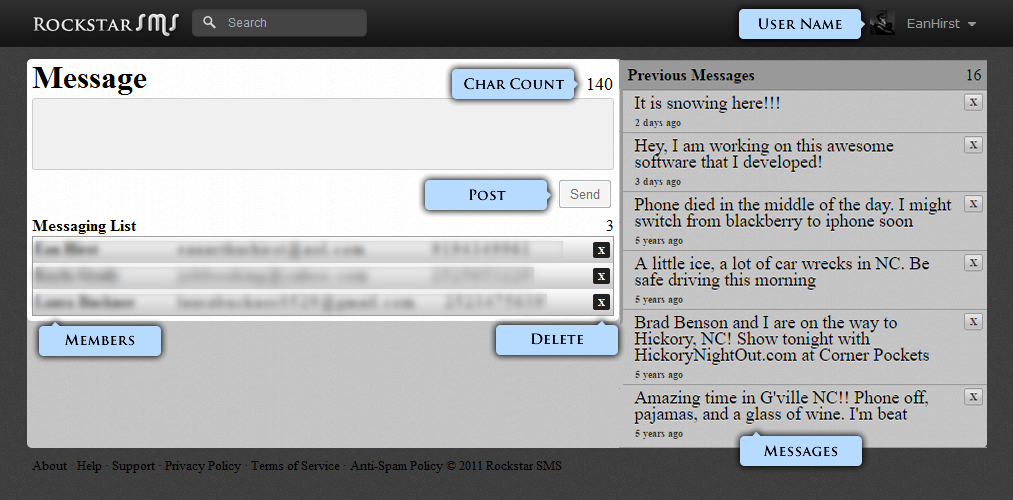
Username is unique and shown in the header. Character count is how much room you have in each text (140 characters, plus a STOP footer we add). Send delivers the message to opted-in members. Members are the people who receive your messages. Delete removes a member or an old message. Previous messages is your history.
Account settings
Update display name, username, picture, email, join notifications, and password. Email is how you sign in; one email per account.